



MON, SEP 14 | TUES, SEP 15 | WED, SEP 16 | THURS, SEP 17 | FRI, SEP 18 |
|---|---|---|---|---|
🏠4:30 - 5:30 pm Open House | 🧑⚕️Spirit Day: Dress as your dream career | 🚌Ms. Volk's class on a field trip | ||
MON, SEP 21 | TUES, SEP 22 | WED, SEP 23 | THURS, SEP 24 | FRI, SEP 25 |
11 am- SAC nominations due 5:30 pm SAC meeting |
School Advisory Council
The Cataraqui Woods Elementary School Advisory Council (CWESAC) works together with school staff and families to enrich our children’s school experience through events, communication, fundraising, and community-building. You are invited to stay updated and connect with the Council on Facebook.
School Advisory Council Executive Positions
It's that time of year! School Council elections for executive positions are coming up very soon! The first School Council Meeting of the 2026-2027 school year is on Monday September 21st at 5:30pm in the staff room and elections will be held at this meeting. All parents/guardians are welcome!
Please use the following link for a description of the positions and to submit nominations: Cataraqui Woods Elementary School Advisory Committee Nomination Form
Nominations are anonymous and you can nominate yourself or someone else for a position. If you are nominating someone, please ensure they are up for the position and have agreed to your nomination. The person you nominate must be available to be present at the meeting. Your nomination does not count as a vote; you must be present to vote. Nominations are due by 11am on Monday September 21, 2026.
Great! The nomination form will need to be sent out by email at least 2 weeks before the first meeting. The first meeting is scheduled for September 21st. So if you could send it out towards the end of next week that would be great.
Alison Billings
Chair
She/Her
🎉 Advisory Council Needs Bingo Volunteers! 🎉
Help support our school — just 2 hours of your time can make a big difference!
We're looking for volunteers to help out at Play! Gaming & Entertainment for our school's Bingo fundraising shifts. It’s an easy and fun way to contribute to our school community!
👋 What you’ll do:
• Greet and welcome guests
• Clear dishes and help keep the space tidy
• Assist with customer needs
🕒 Shift length: Just 2 hours
🧑🏫 Training:
• Complete a quick 15-minute online training
• Shadow an experienced volunteer for one shift
🔗 Ready to get started?
1️. Complete the online training: https://pcga-kingston.ca/Training
2️. E-mail us at cwesbingo@gmail.com to schedule your shadow shift
📣 Open to all members of the school community! Whether you’re a parent, grandparent, guardian, teacher, or staff member — we’d love to have your help!
- SCHOOL HAPPENINGS -

Our Open House will take place on Wednesday, September 16, from 4:30 to 5:30 p.m. Families are invited to visit classrooms, meet staff, and learn more about the exciting opportunities that await this school year. We look forward to welcoming both new and returning members of our Cat Woods community!

Our Daily Schedule
8:55 - 9:10 am | Supervision on yard |
9:10 - 10:50 am | 100 minute instructional block |
10:50 - 11:30 am | Recess & Nutrition Break |
11:30 - 1:10 pm | 100 minute instructional block |
1:10 - 1:50 pm | Recess & Nutrition Break |
1:50 - 3:30 pm | 100 minute instructional block |
3:30 pm | Dismissal |
🚨IMPORTANT **Cell Phone Policy: For Grades JK-6, cell phones are not to be brought to school under any circumstances. For Grade 7 & 8 cell phones are not permitted in the classroom or on the school yard.
Cat Woods Elementary School
🅿️Driving and Parking Guide
We encourage our parents and students to walk, cycle or take the school bus instead of using cars to get to school. We do understand that there may be circumstances when you need to drive your child to school. If you need to do so, for the safety of your child, their friends, and our neighbours, please drive and park safely and legally. The area immediately in front of the school is a designated Kiss & Ride from 8:55 am to 9:20 am on school days. During this time, you are permitted to stop for a MAXIMUM of 3 minutes, and you MUST stay with your vehicle. Do not leave children in vehicle unattended. If you need to walk your child into the school yard, please use one of the legal parking street parking spots marked on the street.
In addition, please do not walk through the parking lot to access the school yard. Please use the sidewalk just to the left of the parking lot.
🚨The staff parking lot is for STAFF ONLY.
This is a no access zone to non-staff members.
School-Based Occupational Therapy Support
This year, KidsInclusive Occupational Therapists (OTs) will continue to provide classroom-based support to help students develop skills related to learning, participation, self-care, movement, and self-regulation. OTs work alongside teachers to share strategies, resources, and tools that benefit all students in the classroom.
For more information about this program, including how students may access additional support if needed, please click the link below to read the full parent/guardian letter.
➡️ Read the full School-Based Occupational Therapy Support letter here: OT Tiered model letter for families June 2026
 Soccer Cleats Reminder
As soccer season continues, we ask parents and guardians to please have a conversation with their children about the proper use of soccer cleats.
Soccer cleats should only be worn during soccer practices and official soccer games. They are not to be worn at recess, on playground equipment, on pavement, in classrooms, or during regular school activities. Wearing cleats outside of soccer activities can increase the risk of injury, cause unnecessary wear and tear on the cleats, and may damage school property.
Thank you for helping us reinforce this important safety reminder. We appreciate your support in ensuring that students are using their soccer equipment appropriately and safely. ⚽️
Volunteer Screening Reminder for Parents and Guardians
Parent and guardian volunteers play an essential role in our school community, helping to support learning opportunities both in the classroom and on school field trips. In order for volunteers to be ready to participate in the new school year when opportunities arise, we encourage families to begin the volunteer screening process as early as possible.
Board policy requires all parents/guardians who wish to volunteer at school or attend school field trips to complete a mandatory screening process, which includes a Police Criminal Record Check, commonly referred to as a CPIC or Vulnerable Sector Check (VSC).
Please note:
- CPICs/Vulnerable Sector Checks must be renewed and approved every three years.
- During the years between renewals, volunteers must complete an Annual Offence Declaration Form.
- The process of obtaining a Vulnerable Sector Check/CPIC can take time, so families are encouraged to apply early in the school year to avoid missing volunteer opportunities and field trips.
Applications can be submitted online through the appropriate police service:
- Kingston Police offers an automated online system for submitting Vulnerable Sector Check/CPIC applications.
- Ontario Provincial Police (OPP) also offers an online system for individuals requiring a Record Check or Vulnerable Sector Check.
If a letter from the school is required to accompany your Vulnerable Sector Check request, please contact the school office and we will be happy to assist you.
Thank you for your support and involvement in our school community!
How Can I order School Spirit Wear?

Click here to see spirit wear options and order - Cataraqui Woods Elementary School - eStore
🤔How Can I get Information From the School?
LDSB schools and school board use School Messenger to send key messages, alerts, and general communication to families. Cat Woods uses this platform and will continue to use our newsletters to provide updates to families. These newsletters are where we will share school-specific information and highlights of student work and events in the building. This newsletter is sent out via School Messenger and posted on our school Twitter account and website.
For help to set up your School Messenger App account, click here: Parent_Guardian_Guide_for_setting_up_a_School_Messenger_App_Account.pdf
School Messenger App: Download the School Messenger App to stay connected. Use your mobile device to download and install the free School Messenger blue app from the Apple App Store or the Google Play Store, the SchoolMessenger website portal, or from within the LDSB mobile app.
The first time you use the app, you must select Sign Up to create your account. Please ensure you use the same email address your student’s school has on file. If you do not use that same email address, you will not be able to create an account.
How to use school Messenger Video
How Do I Report An Absence?
🚨IMPORTANT **We are no longer accepting calls to the school to report student absences. Please choose one of the options below.
Please use the Safe Arrival system to report your child's absence; do not call the school to report an absence. If your child is going to be absent from learning, please ensure you use the Safe Arrival system to report the absence. If your child will be late, please report a full day absence and then we will sign them in when they arrive. You cannot indicate a half day absence.
How to report your absence:
1. Toll-free telephone
- Call 1-855-257-9349 toll-free to report an absence using the automated phone system.
2. School Messenger App
- Use your mobile device to download and install the free SchoolMessenger blue app from the Apple App Store or the Google Play Store, the SchoolMessenger website portal, or from within the LDSB mobile app.
- The first time you use the app, you must select Sign Up to create your account. Please ensure you use the same email address your student’s school has on file. If you do not use that same email address, you will not be able to create an account, or may not be able to see the "Attendance" option. You may have already created an account when we introduced the Communicate broadcast system.
- Select Attendance, then select Report an Absence and follow the prompts.
3. SchoolMessenger SafeArrival Website Portal
- Visit the SchoolMessenger website portal.
- The first time you use the app, you must select Sign Up to create your account. Please ensure you use the same email address your student’s school has on file. If you do not use that same email address, you will not be able to create an account, or may not be able to see the "Attendance" option. You may have already created an account when we introduced the Communicate broadcast system.
- Select Attendance, then Report an Absence and follow the prompts.
 Hot Lunch & Milk
Hot lunch and milk ordering will begin the week of October 11. Watch for more information regarding how to order coming soon.
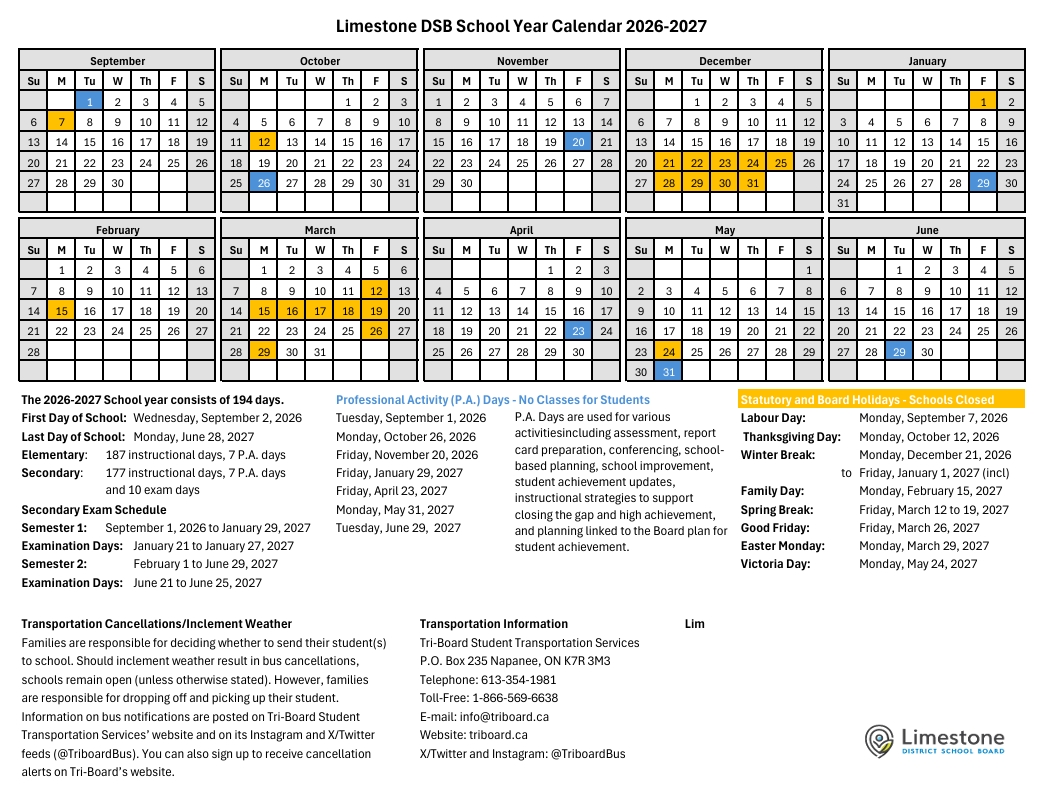
2026-2027 LDSB School Year Calendar
A PDF version of the 2025-2026 School Year Calendar is available online.
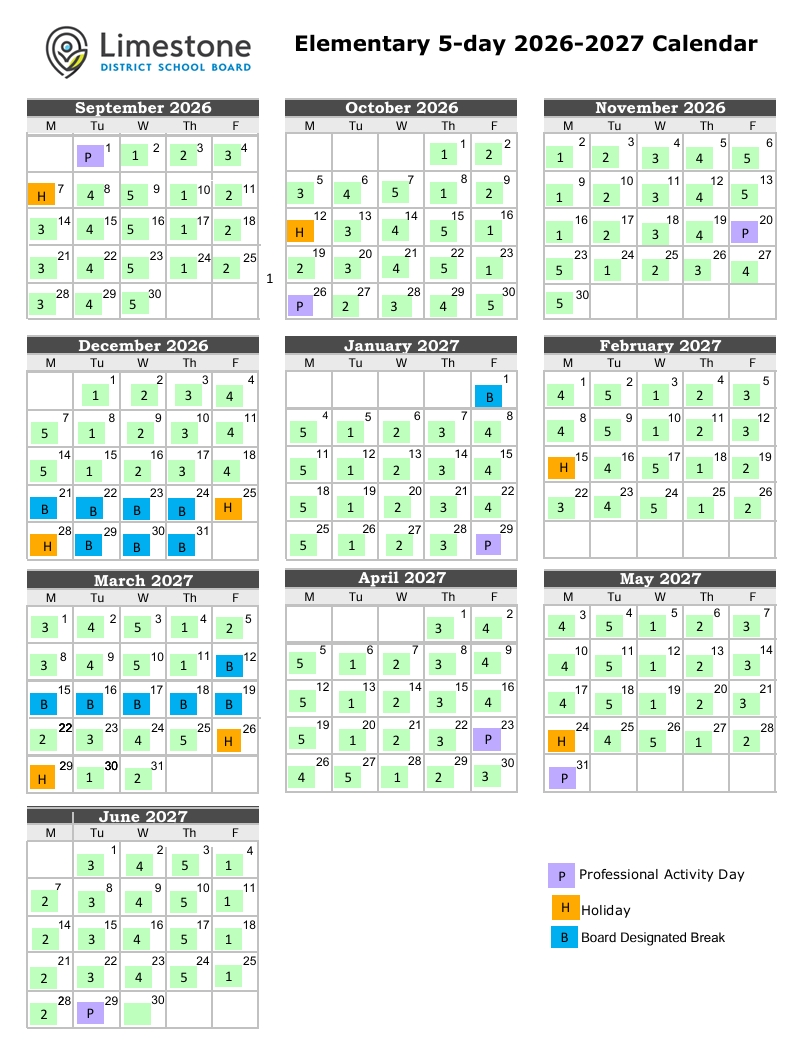
5-day rotation calendar: https://www.limestone.on.ca/documents/799b287e-ccf9-4a9b-a88b-49835c51d737/NEW-2026-2027-Day-Calendar.pdf?fingerprint=ppb20260428201349&fingerprint=ppb20260428201349
Allergen Awareness - Nut-Free School

Thank you for packing nut-free snacks! Please communicate
with teachers before sending any treats in for your student's class.


